

PM agents
Six agents. You set the limits.
Agents do the follow-up, the reporting and the watching. You choose how far each one may go, and everything it produces says whether a rule or a model wrote it.
Payment gateway failover test
Customer Portal · finish date 16 Sep · 13 days overdue
It is not marked done. Where does it stand?
History
- Status Chaser asked Priya Raman where it stands
- Priya Raman promised 7 Oct
- Agents
- 6
- Autonomy tiers
- 3
- Observe, Propose, Act
- Marks on every output
- 2
- AI or Automated
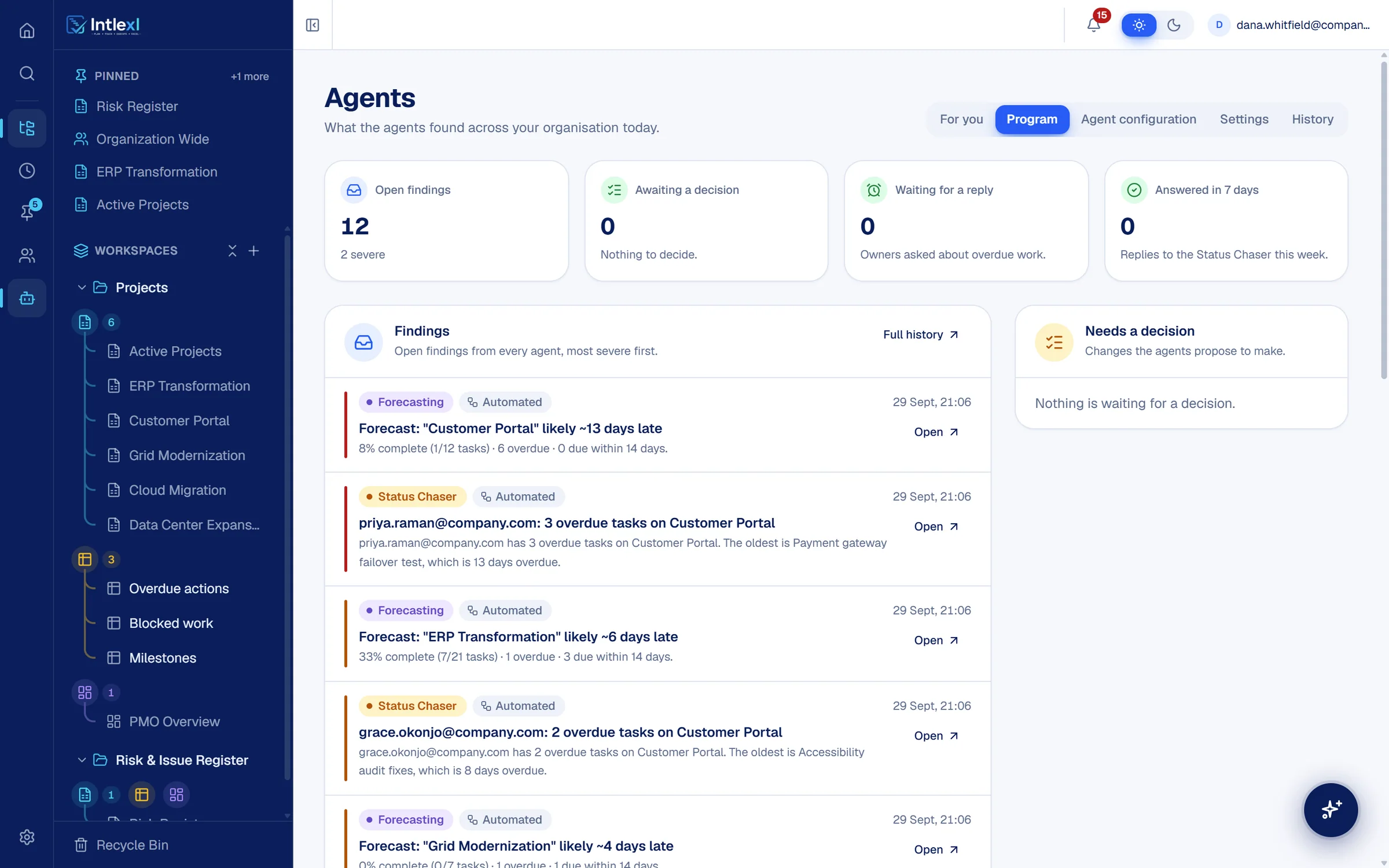
- Views on the Agents page
- 5
- For you, Program, Agent configuration, Settings, History
Autonomy
You set how far each agent may go.
Observe
Reads your plans and reports what it finds.
Findings appear for the right people. Nothing is changed.
Propose
Drafts the action and waits for a person.
Each proposal shows what approving it will do, with Approve and Dismiss.
Act
Carries out approved kinds of action on its own.
Only where an administrator has enabled it, inside the limits you set.
Agent 01
Can use AIStatus Chaser
Follows up on overdue work for you.
Takes over: Chasing stale tasks by message and meeting.
- Finds tasks that are overdue and not done
- Asks each owner in the app, on a cadence you set
- Records the answer: done, still working, new date or blocked
- Escalates by policy and keeps a history for every task
Priya Raman: 3 overdue tasks on Customer Portal. The oldest is Payment gateway failover test, which is 13 days overdue.
A model can word the request. Tasks, dates and counts are always automated.
Agent 02
AutomatedStandup and Status Report
The daily report, written before anyone asks.
Takes over: Compiling the daily standup and status update.
- Compiles a daily standup across every project in scope
- Produces a status report from the same data
- Lists what changed, what is late and what is blocked
Daily project health, 30 September: 9 tasks past their deadline in 4 plans, led by Customer Portal with 6, and no dependency cycles.
Agent 03
AutomatedIntake Triage
No request sits without an owner.
Takes over: Checking the intake form for new requests.
- Checks submissions to your intake forms every day
- Flags any request nobody has picked up
- Puts it in front of the people who can assign and prioritise it
Supplier onboarding portal: a new request with no owner.
Agent 04
AutomatedRisk and RAID
Spots the risk and puts it on the register for approval.
Takes over: Keeping the RAID register current by hand.
- Detects risks from schedule, dependency and workload signals
- Proposes a register entry for each one, logged once a person approves (straight away at Act)
- Leaves every entry visible and reviewable
Proposed for the Risk Register: Tomas Bauer is over-allocated at 130% in the weeks of 5, 12 and 19 October.
Agent 05
AutomatedForecasting and Early Warning
See the slip before the date moves.
Takes over: Finding out a plan is late when it is already late.
- Projects whether each plan will hit its dates
- Flags the plans that are likely to slip, with how far
- Shows the overdue and upcoming work behind the forecast
Forecast: "Customer Portal" likely ~13 days late. 6 overdue, most overdue Payment gateway failover test.
Agent 06
Can use AIResource Profiler
Know who has done what.
Takes over: Asking around for who has the right skills.
- Builds a directory of people and their expertise
- Infers it from the tasks they are assigned across your plans
- Refreshes as the work changes
Create the Resource Directory: 8 people to profile, found from the owners across your plans.
A model can infer expertise tags. Task counts and workspaces are automated.
Decisions
Proposals wait for a person.
At the Propose tier an agent shows what approving will do. Nothing changes until someone approves it, and the decision is on the record.
Needs a decision
Log a risk: cutover runbook review is slipping
ERP Transformation. It was due 23 Sep and is still in progress, ahead of the Phase 2 Go-Live on 19 Oct.
The Agents page
Everything the agents found, in one place.
FAQ
Questions people ask.
Bring one plan. See it run.
In 30 minutes we set up a workspace like yours and show sheets, Gantt, dashboards, capacity and a PM agent at work.