

Skip to content
Intlexl

Plan it.Track it.Close the loop.

Intlexl is project management in a sheet your team already knows how to use, with Gantt, boards, dashboards and resource planning built in, and six PM agents that chase the updates for you.

  • Six PM agents
  • 100+ AI tools
  • Imports from Smartsheet, Microsoft Project and Excel
Which projects need my attention this week?

Intlexl AI

Entire organization

AI

Which projects need my attention this week?

This week’s top three:

  • ERP Transformation

    At risk

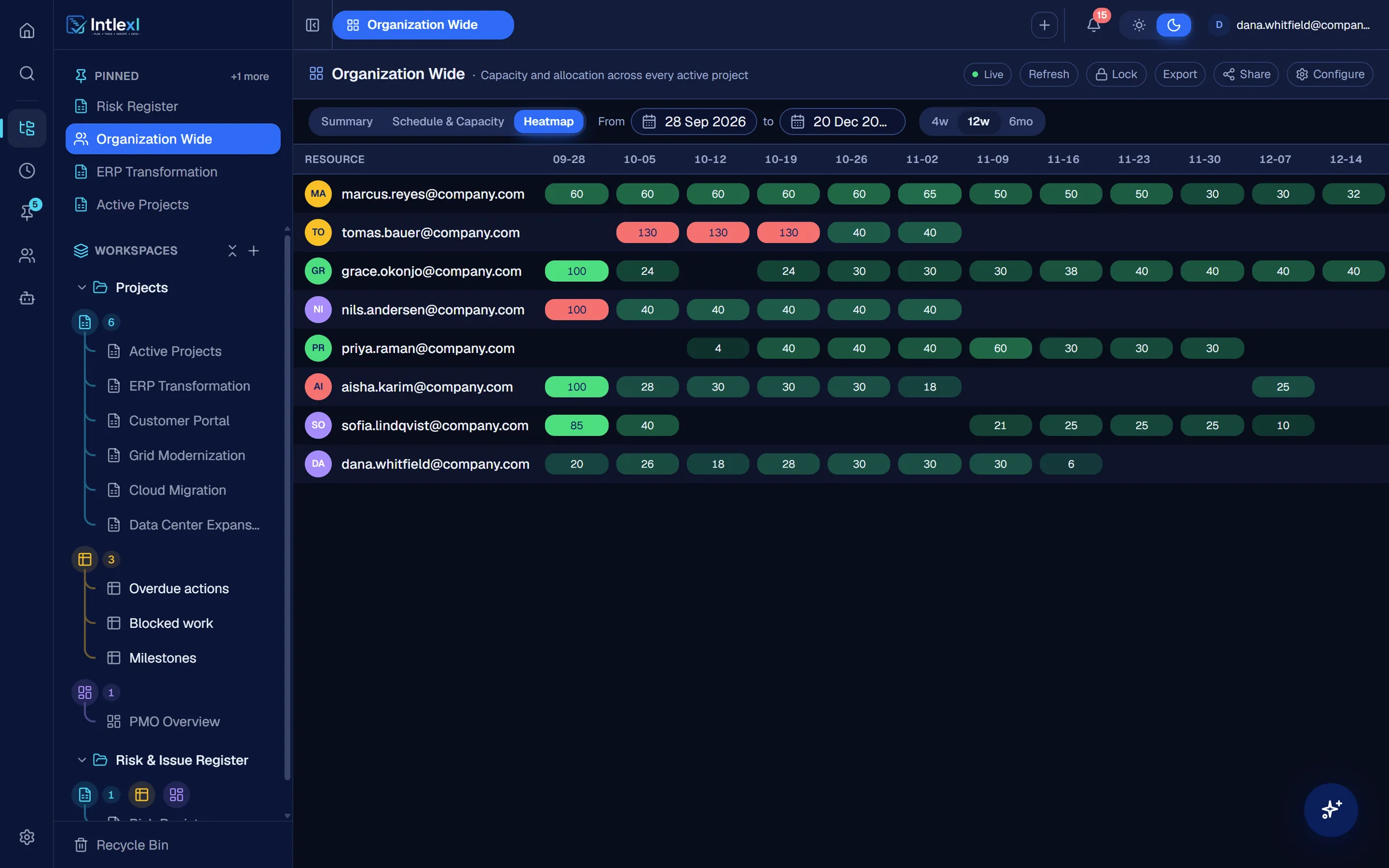
    Go-live has moved 11 days to 19 Oct. Vendor data migration is behind, and Tomas Bauer is booked at 130% from 5 Oct.

  • Customer Portal

    At risk

    Six tasks are overdue, two of them ahead of the Billing Module Launch on 16 Oct.

  • Grid Modernization

    Watch

    Vendor firmware certification is blocked and has pushed the Substation A cutover to 2 Nov.

  • Sheets
  • Gantt and dependencies
  • Kanban and calendar
  • Dashboards
  • Reports
  • Resource manager
  • Forms
  • Automations
  • Intlexl AI
  • PM agents
  • MCP
  • Live editing
  • Roles and sharing

Most project software records the work. Then everyone chases it.

Intlexl closes the loop.

One change. Everywhere at once.

Dana sets a task to Blocked. The sheet colours the row, an automation tells everyone with access, and the dashboard picks it up. Nothing is re-keyed, and nobody sends an email.

The same rows, seen the way each job needs.

A schedule for the planner, a dashboard for the executive, a heatmap for the resource manager. One source, no re-keying.

See the plan the way it will run.

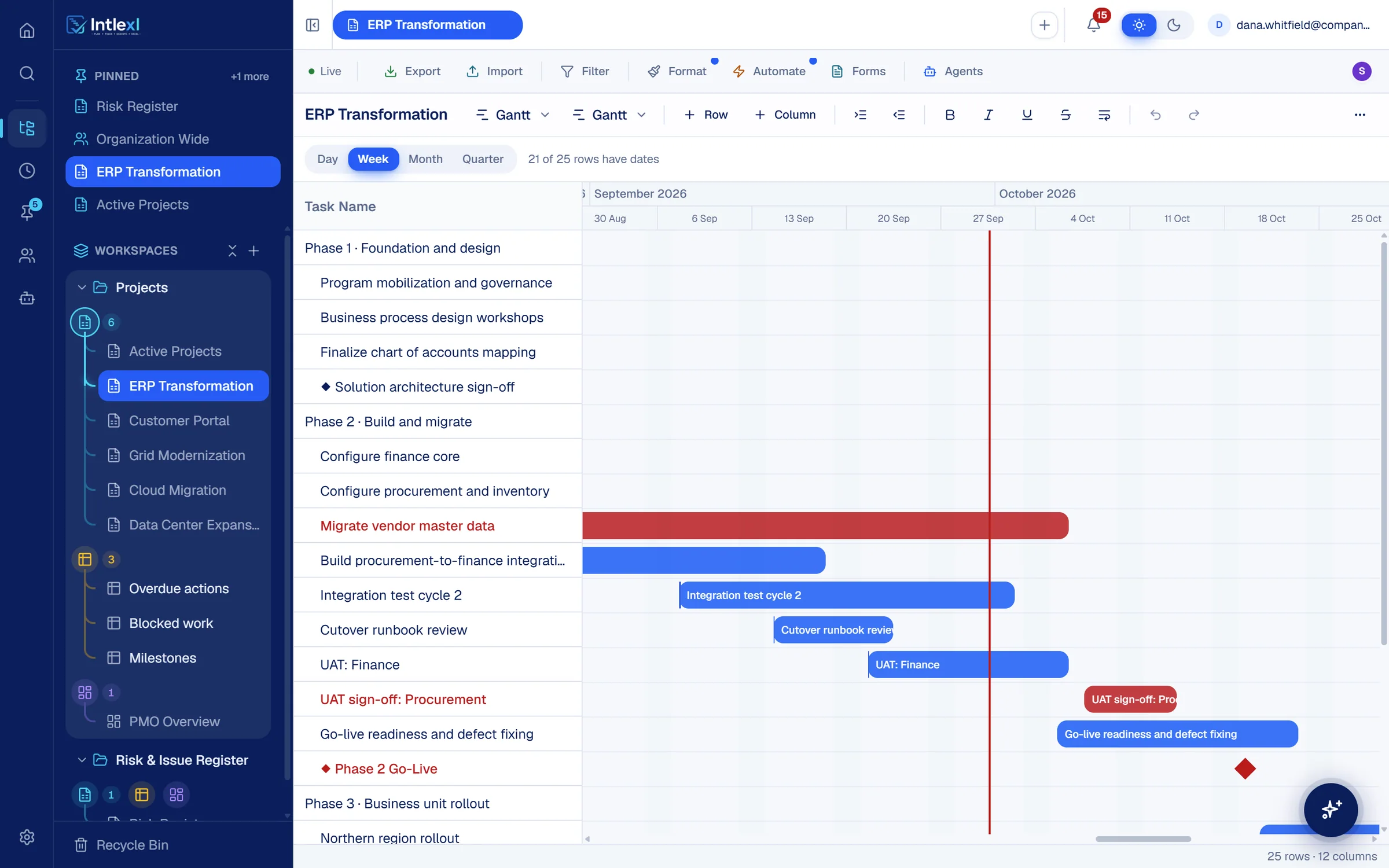
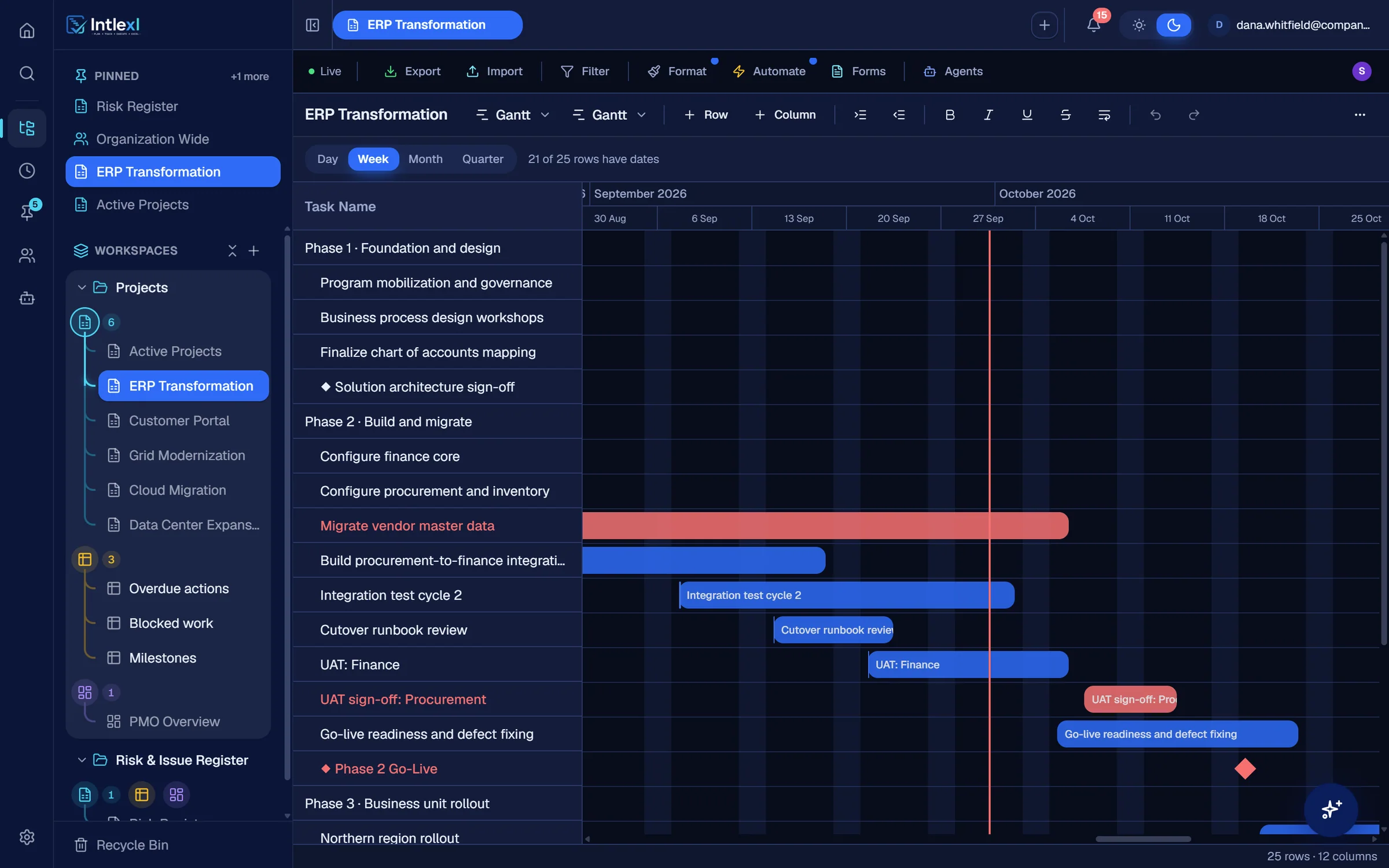
Bars, milestones and critical tasks in red, with today marked. Drag a date and everyone with the sheet open sees it. With dependencies on, the tasks that follow reschedule too.

ERP Transformation · Gantt
Week
Task name
Migrate vendor master data
Build procurement-to-finance integrations
Integration test cycle 2
Cutover runbook review
UAT: Finance
UAT sign-off: Procurement
Go-live readiness and defect fixing
◆ Phase 2 Go-Live
Northern region rollout
SepOctNov
Migrate vendor master data
Build procurement-to-finance integrations
Integration test cycle 2
Cutover runbook review
UAT: Finance
UAT sign-off: Procurement
Go-live readiness and defect fixing
19 Oct
Northern region rollout
Intlexl AIFlagged in this week’s status draft: readiness finishes 23 Oct, after the 19 Oct go-live.

Plan, track, chase, report, forecast, decide.

Plan

Build the plan as a sheet and see it as a Gantt.

ERP Transformation · Gantt
Week
Task name
Migrate vendor master data
Build procurement-to-finance integrations
Integration test cycle 2
Cutover runbook review
UAT: Finance
UAT sign-off: Procurement
Go-live readiness and defect fixing
◆ Phase 2 Go-Live
Northern region rollout
SepOctNov
Migrate vendor master data
Build procurement-to-finance integrations
Integration test cycle 2
Cutover runbook review
UAT: Finance
UAT sign-off: Procurement
Go-live readiness and defect fixing
19 Oct
Northern region rollout
Intlexl AIFlagged in this week’s status draft: readiness finishes 23 Oct, after the 19 Oct go-live.

Track

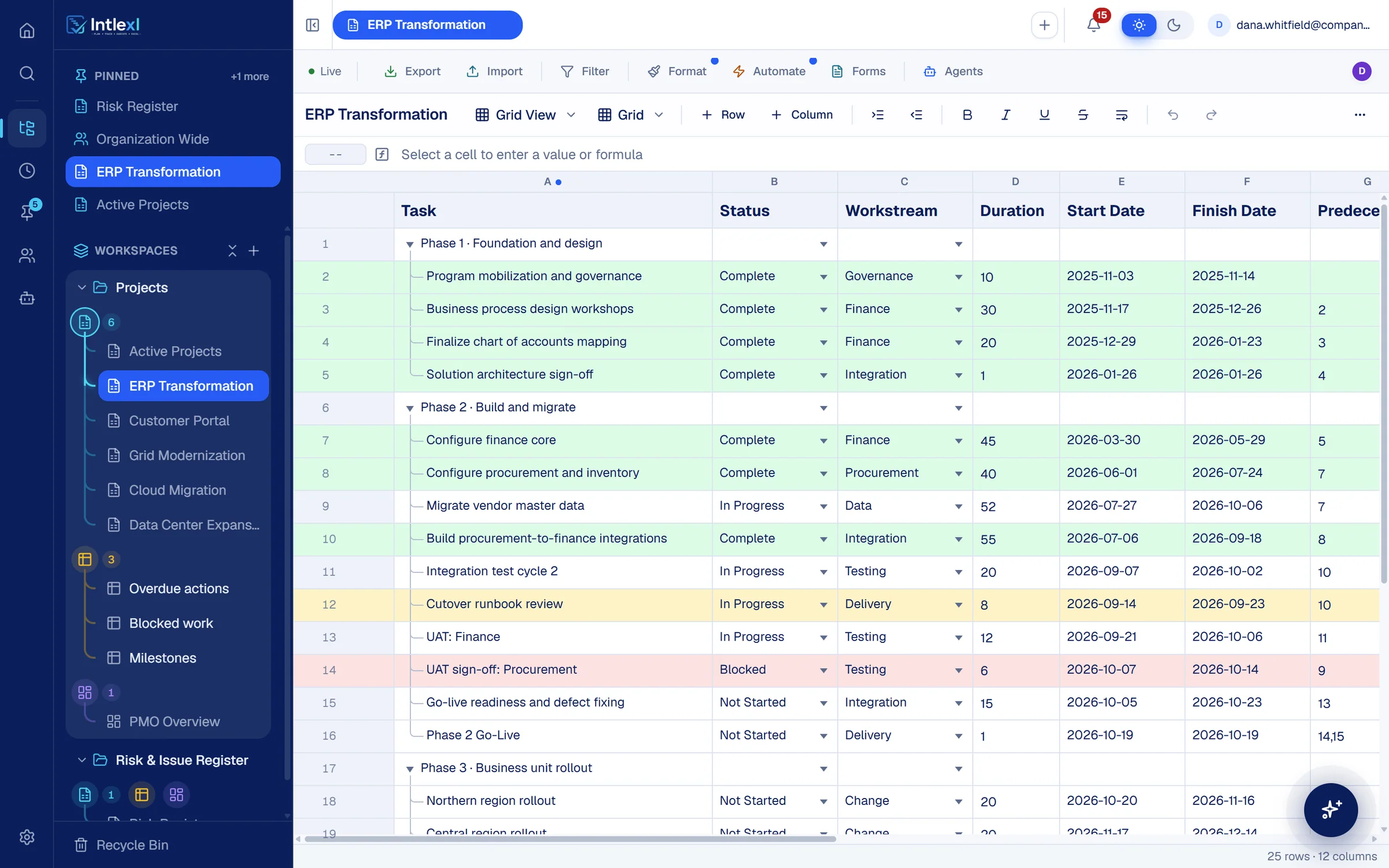
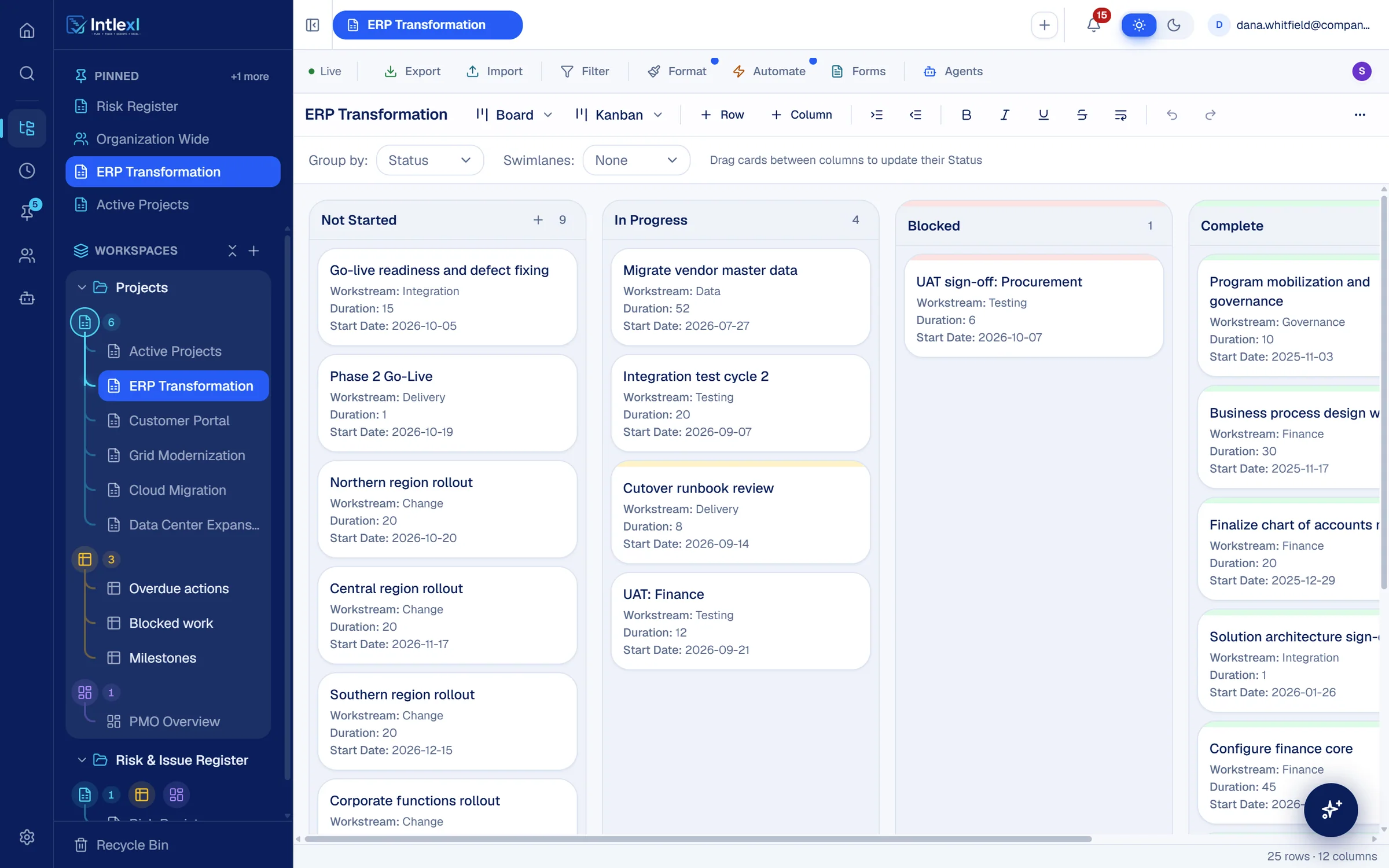
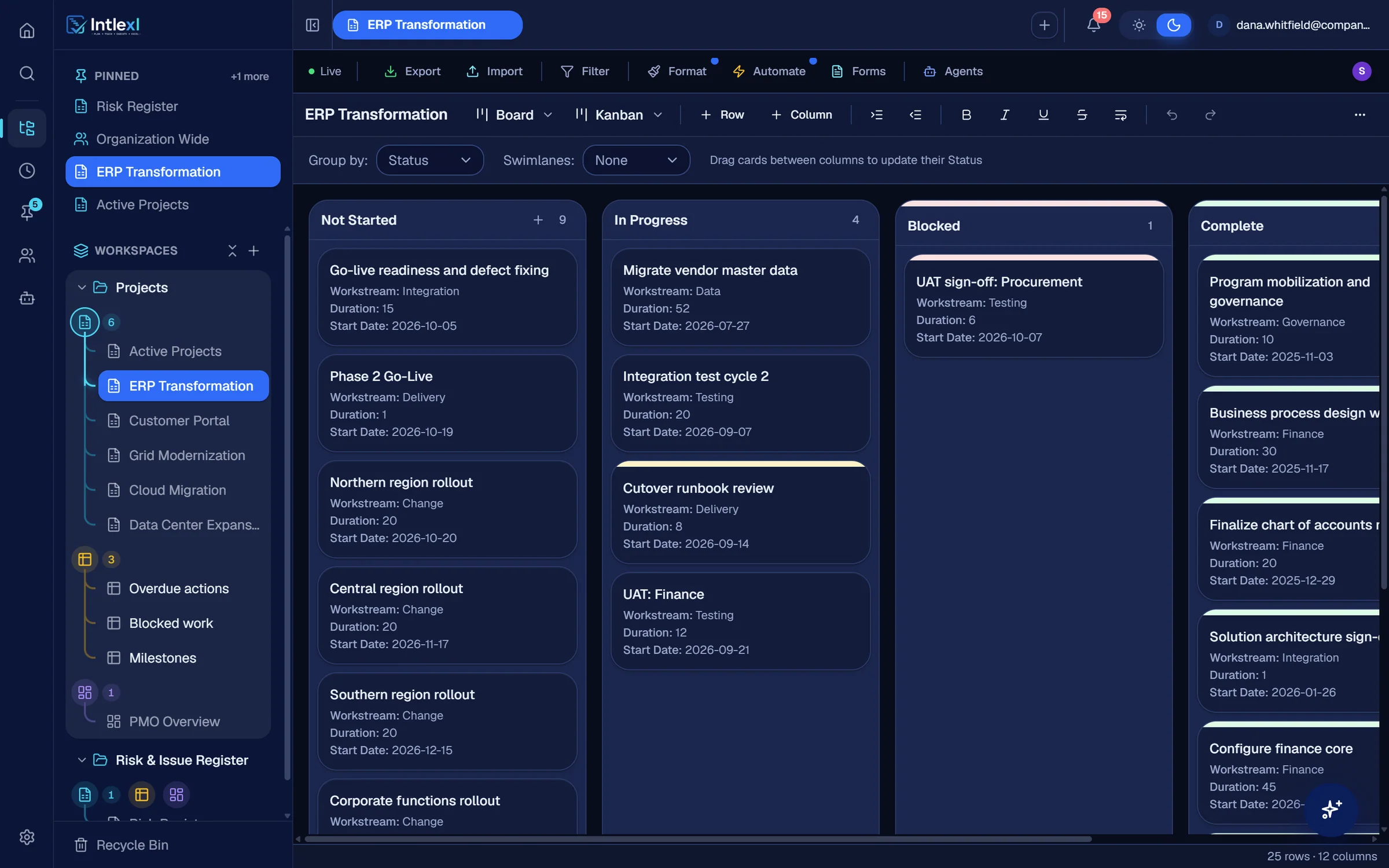
Everyone works in the same live plan.

ERP Transformation
Grid view · 25 rows
TaskStatus
  • Phase 2 · Build and migrate
  • Migrate vendor master data
    In Progress
  • Build procurement-to-finance integrations
    Complete
  • Integration test cycle 2
    In Progress
  • Cutover runbook review
    In Progress
  • UAT: Finance
    In Progress
  • UAT sign-off: Procurement
    In Progress
  • Phase 2 Go-Live
    Not Started
Row coloursBlockedOverdueComplete

Automation: Flag blocked work

  1. WhenStatus changes
  2. IfStatus is Blocked
  3. ThenNotify everyone with access

UAT sign-off: Procurement is blocked. Sent to everyone with access to ERP Transformation.

PMO Overview · Blocked work

1

  • UAT sign-off: ProcurementERP
  • Vendor firmware certificationGrid

Chase

The Status Chaser does the follow-up.

Status ChaserAutomated09:14

Payment gateway failover test

Customer Portal · finish date 16 Sep · 13 days overdue

It is not marked done. Where does it stand?

DoneStill workingNew dateBlocked
Promised date7 Oct 2026
Recorded in the task history.
Customer Portal
TaskStatusFinish
Payment gateway failover testIn Progress16 Sep
13 days overdueOwner promised 7 Oct

History

  1. Status Chaser asked Priya Raman where it stands
  2. Priya Raman promised 7 Oct

Report

A status report without the meeting.

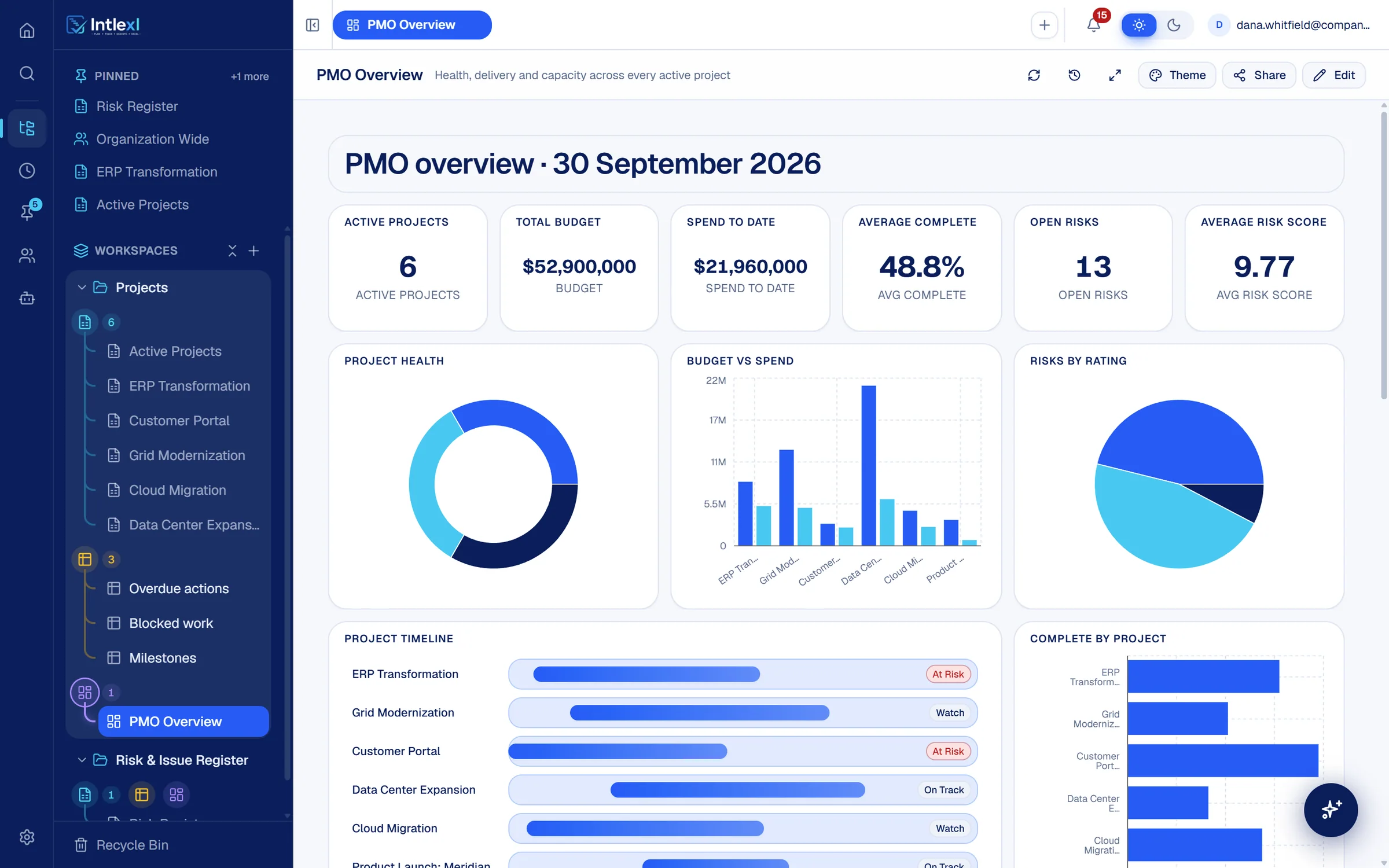
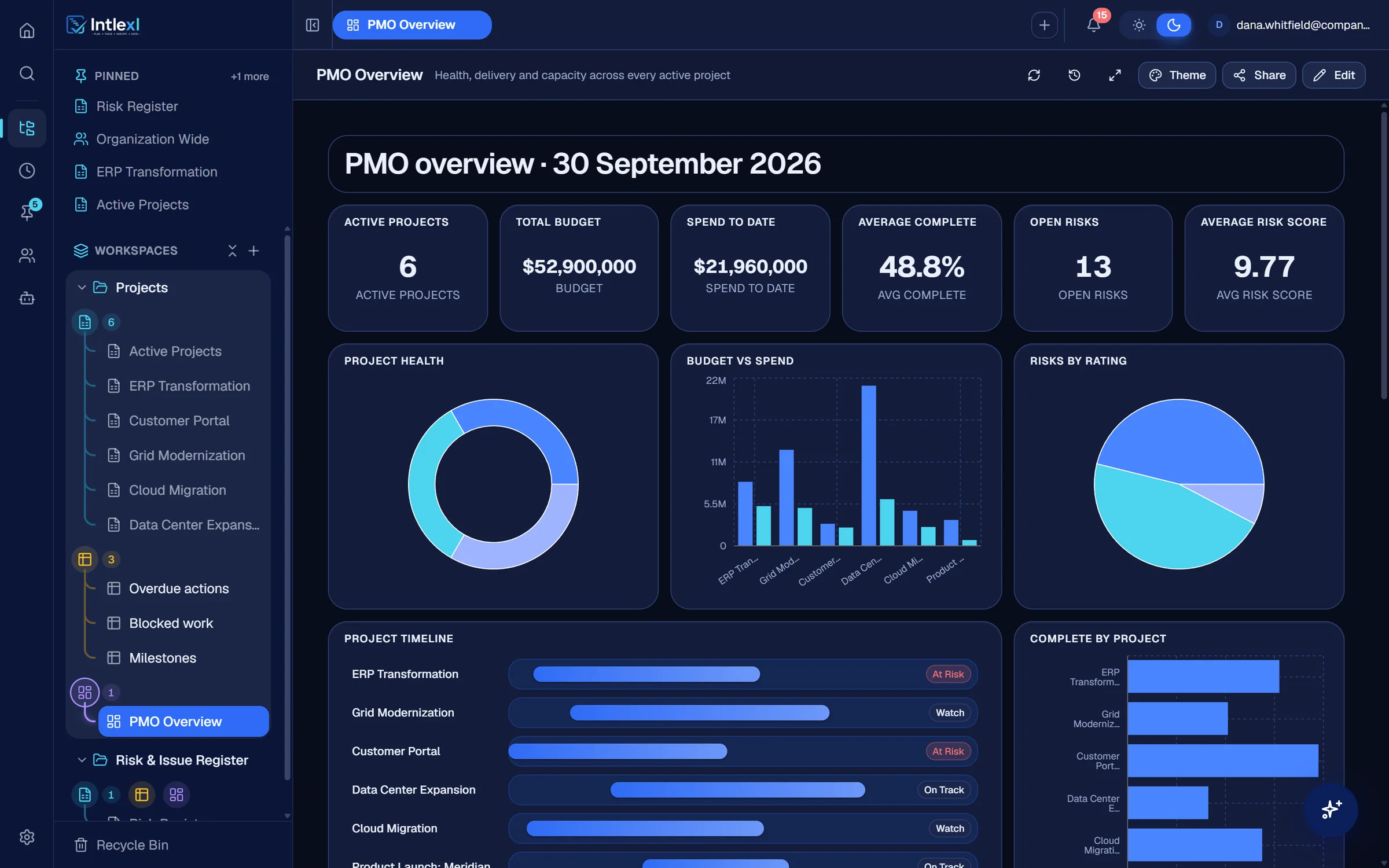
PMO Overview
30 September 2026

Active projects

6

Total budget

$52.9M

Spend to date

$21.96M

Average complete

48.8%

Project health

  • At risk2
  • Watch2
  • On track2

At risk: ERP Transformation, Customer Portal

Complete by project

  • ERP62%
  • Grid41%
  • Portal78%
  • Data Center33%
  • Cloud55%
  • Meridian24%

Budget vs spend

BudgetSpend
21M14M7M0

Data Center Expansion

Budget $21.0MSpend $6.12M

ERPGridPortalData CenterCloudMeridian

Project timeline

Sep 2025 to Sep 2027
  • ERP
    At risk
  • Grid
    Watch
  • Portal
    At risk
  • Data Center
    On track
  • Cloud
    Watch
  • Meridian
    On track

Forecast

See the slip before the date moves.

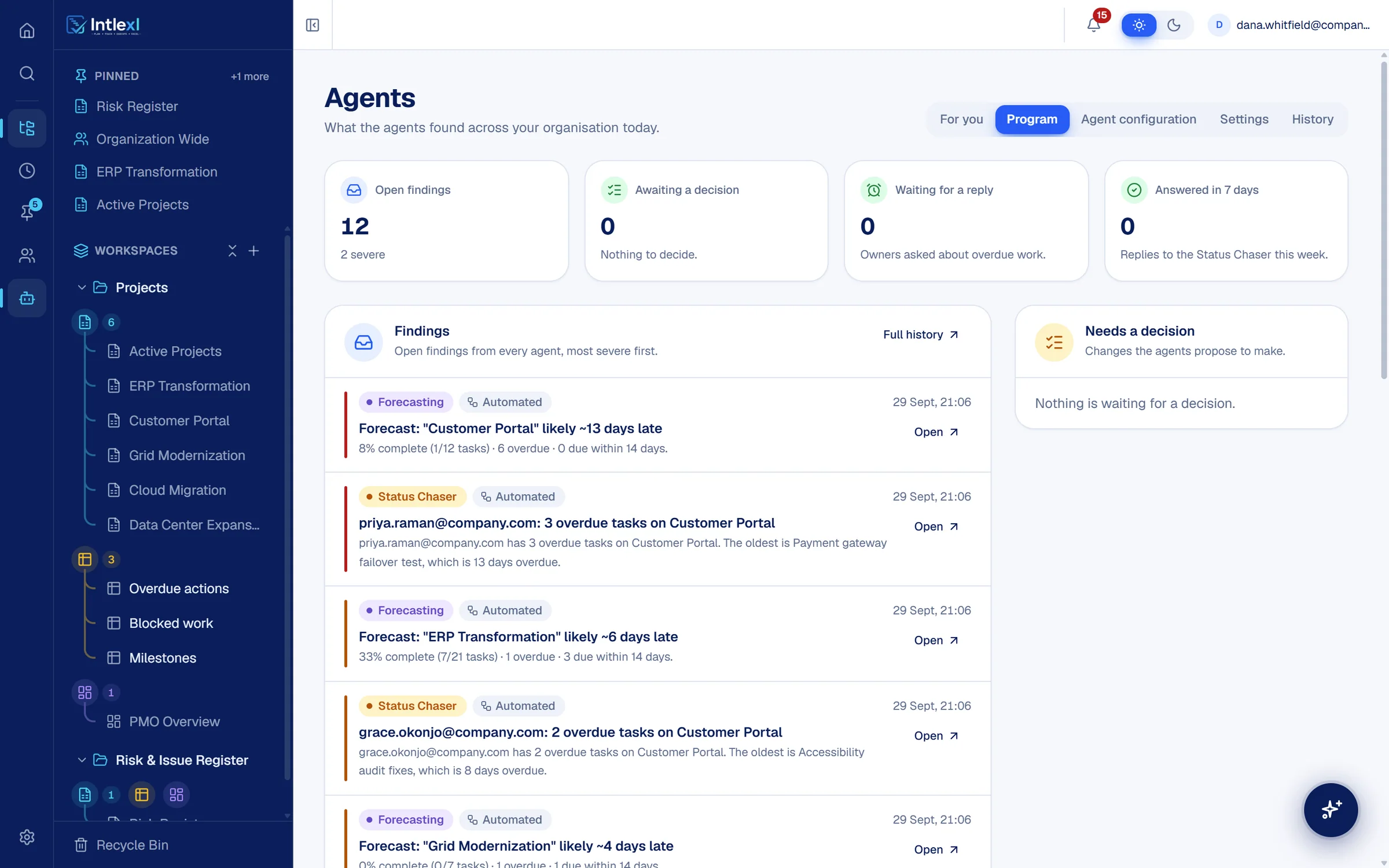
Agents · Findings
Automated
Forecasting and early warning, most severe first29 Sept, 21:06
  • ForecastingSevere

    “Customer Portal” likely ~13 days late

    6 overdue · most overdue: Payment gateway failover test

    Next milestone: Billing Module Launch · 16 Oct

    ~0

    days late

  • ForecastingHigh

    “ERP Transformation” likely ~6 days late

    1 overdue · most overdue: Cutover runbook review

    Next milestone: Phase 2 Go-Live · 19 Oct

    ~0

    days late

  • ForecastingMedium

    “Grid Modernization” likely ~4 days late

    1 overdue · most overdue: Vendor firmware certification

    Next milestone: Substation A Cutover · 2 Nov

    ~0

    days late

  • ForecastingMedium

    “Data Center Expansion” likely ~4 days late

    1 overdue · most overdue: Cooling system RFP

    Next milestone: Building Shell Complete · 18 Dec

    ~0

    days late

Projected from each plan’s overdue tasks. Counts and dates come from the sheets, not a model.

Decide

Agent changes wait for a person, unless an administrator has enabled Act.

Needs a decision

Risk and RAIDAutomatedPropose tier

Log a risk: cutover runbook review is slipping

ERP Transformation. It was due 23 Sep and is still in progress, ahead of the Phase 2 Go-Live on 19 Oct.

If you approve: a row is added to the Risk Register, owned by Tomas Bauer.
ApproveDismiss
Risk Register
RiskRatingOwner
Phase 2 schedule exposureHighDana
Firmware certification delayHighMarcus
Cutover runbook slippingHighTomas

Every week, someone rebuilds the status report by hand.

Intlexl drafts it from the plan.

Intlexl AI

Ask it. Then let it do the work.

An assistant inside every screen that reads your sheets, dashboards and schedules, and can change them within your permissions.

Which projects need my attention this week? Give me the top three with the reason for each.

This week's top three

Thought for 5s · read both workspaces

AI

1. ERP Transformation

At risk

Phase 2 Go-Live has already moved 11 days, to 19 Oct. The vendor master data migration is 11 days behind and 70% done. From 5 Oct, Tomas Bauer is booked at 130%.

2. Customer Portal

At risk

Six tasks are one to two weeks overdue, two of them ahead of the Billing Module Launch on 16 Oct. 83% of the budget is spent against 78% of the work.

3. Grid Modernization

Watch

The vendor's firmware certification is blocked and was due 25 Sep. It has already pushed the Substation A cutover to 2 Nov.

Cloud Migration and Data Center Expansion just missed the list, with reasons.

Answers recorded from the running app on the demo workspace, shortened.

100+
tools it can use on your workspace
3
scopes: organisation, workspace or one sheet
Asks first
before anything structural or destructive

Six agents do the follow-up.

Chasing, reporting and watching the plans, each at a tier you choose. Everything an agent produces says whether a rule or a model wrote it.

  1. Observe

    Reads your plans and reports what it finds.

    Findings appear for the right people. Nothing is changed.

  2. Propose

    Drafts the action and waits for a person.

    Each proposal shows what approving it will do, with Approve and Dismiss.

  3. Act

    Carries out approved kinds of action on its own.

    Only where an administrator has enabled it, inside the limits you set.

An agent asks. The answer is on the record.

The Status Chaser finds an overdue task, asks its owner where it stands, and keeps the answer in the task history.

Status Chaser

Can use AI

Follows up on overdue work for you.

Takes over: Chasing stale tasks by message and meeting.

Standup and Status Report

Automated

The daily report, written before anyone asks.

Takes over: Compiling the daily standup and status update.

Intake Triage

Automated

No request sits without an owner.

Takes over: Checking the intake form for new requests.

Risk and RAID

Automated

Spots the risk and puts it on the register for approval.

Takes over: Keeping the RAID register current by hand.

Forecasting and Early Warning

Automated

See the slip before the date moves.

Takes over: Finding out a plan is late when it is already late.

Resource Profiler

Can use AI

Know who has done what.

Takes over: Asking around for who has the right skills.

Requests in. Rules run. Nobody re-keys a thing.

A form writes straight to a sheet, and an automation reacts to the new row. Both work on the plans your team already uses.

Thirteen actions a rule can take

  • Set a cell
  • Apply formatting
  • Create a row
  • Delete a row
  • Lock a row
  • Unlock a row
  • Assign people
  • Notify
  • Email
  • Teams
  • Slack
  • WhatsApp
  • Webhook

Connect

Bring your own AI. Keep your own rules.

Intlexl runs an MCP server with more than a hundred tools, so Claude and other AI clients can read and edit your projects with a token you control.

  • read

    Look, never touch

  • edit

    Change cells and rows

  • structural

    Sheets, columns, workspaces

  • admin

    Admins only

MCP client · connected to Intlexl

This is the product, not a mock-up.

Captured from the running app on a live demo workspace. The animated scenes on this page are drawn in code from the same design; these screens are the software itself.

Swipe sideways to explore

Who can see it, who changed it, and what the agents did.

Access, history and approvals are part of the product, so you can show exactly how every project is governed.

  • Clear roles on every item

    Owner, editor and viewer on every workspace, sheet, dashboard, report and resource manager, on top of organisation roles.

  • Changes on the record

    Cell edits, structural changes and MCP writes are logged with who, what and when. Agents keep their own history.

  • You hold the keys to AI access

    Personal MCP tokens with read, edit, structural or admin scope, revocable at any time.

Move in without starting over.

The import centre reads your Smartsheet and Microsoft Project plans, shows how each column will map, and only then writes them. Excel imports straight into a sheet.

  1. 1Connect
  2. 2Choose
  3. 3Map
  4. 4Import

One set of plans, read the way each role needs.

Every project, current, in one view.

  • A PMO dashboard with health, budget and timeline
  • Forecasts flag the plans likely to slip
  • A decision queue for everything that needs you
How Intlexl works for PMO directors

Intlexl

noun
  1. 1.Project management that works like a spreadsheet and does the follow-up for you.
  2. 2.The sheet, Gantt, board and dashboard a PMO shares, with PM agents that chase status and flag a slip before the date moves.

In use: “Put it in Intlexl and the Status Chaser will ask the owners.”

Plan · Track · Execute · Excel

Questions, answered.

Intlexl is AI-native project management software for PMOs. Plans live in sheets that work like a spreadsheet, with owners, dates and dependencies, and the same data drives Gantt charts, boards, dashboards, reports and resource capacity. An in-app assistant and six PM agents chase status, forecast slips and keep the risk register, and they only change data at the tier an administrator allows.

There are six agents: Status Chaser, Standup and Status Report, Intake Triage, Risk and RAID, Forecasting and Early Warning, and Resource Profiler. Each runs at a tier you set. Observe only reports, Propose drafts an action and waits for a person to approve it, and Act carries out approved kinds of action where an administrator has enabled it.

Every agent output carries a mark. Automated means it came from rules applied to your data. AI means a model wrote that part, such as the wording of a message. Counts, dates and task lists are always automated.

Yes. The import centre connects to Smartsheet with an API key, and reads Microsoft Project files saved as XML. You can also import an Excel workbook into a sheet and export any sheet back to Excel. For Smartsheet and Microsoft Project you see how columns will map before anything is written.

Yes. Intlexl runs an MCP server with more than 100 tools. You create a personal token with read, edit, structural or admin scope, and you can revoke or refresh it at any time. Activity from MCP clients is logged.

Access is set by role. Workspaces, sheets, dashboards, reports and resource managers each have owner, editor and viewer access, layered on organisation roles and permission keys managed by a separate access service. Access across organisations is denied.

It keeps what people like about them: a grid, formulas, copy and paste, and Excel import and export. It adds what a workbook cannot hold: owners with allocations, real dates and dependencies, a history for every row, and one live version that everyone edits together.

Licensing is per seat, with agents licensed per active agent per project. Rates are agreed with you, so book a demo and we will size it to your PMO.

Bring one plan. See it run.

In 30 minutes we set up a workspace like yours and show sheets, Gantt, dashboards, capacity and a PM agent at work.